Custom Policies
This page was machine-translated. The Japanese page is the official version.
Custom policies are created by users to configure operation permissions as needed.
Create a custom policy
- On the
Access Managementpage, open the Policies tab and clickAdd Policy.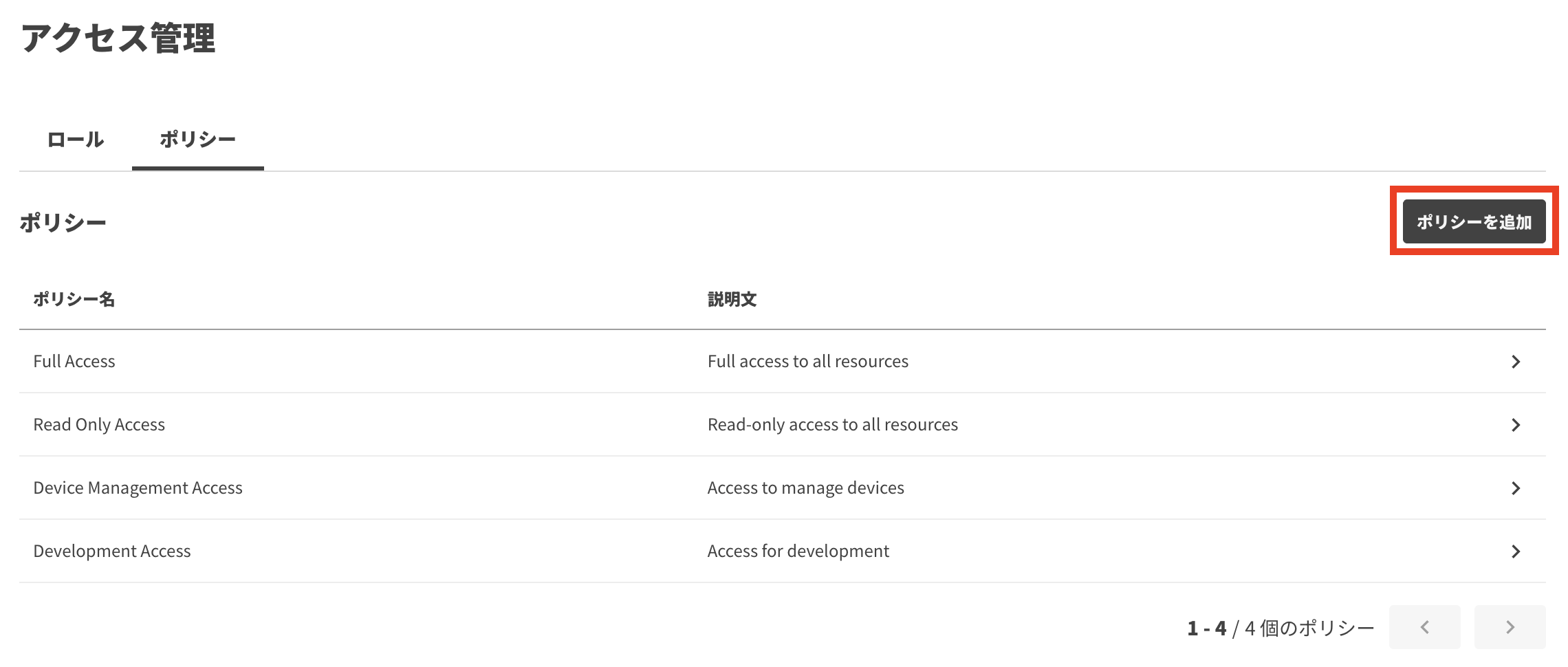
- Enter a policy name, configure its permissions, and click
Save.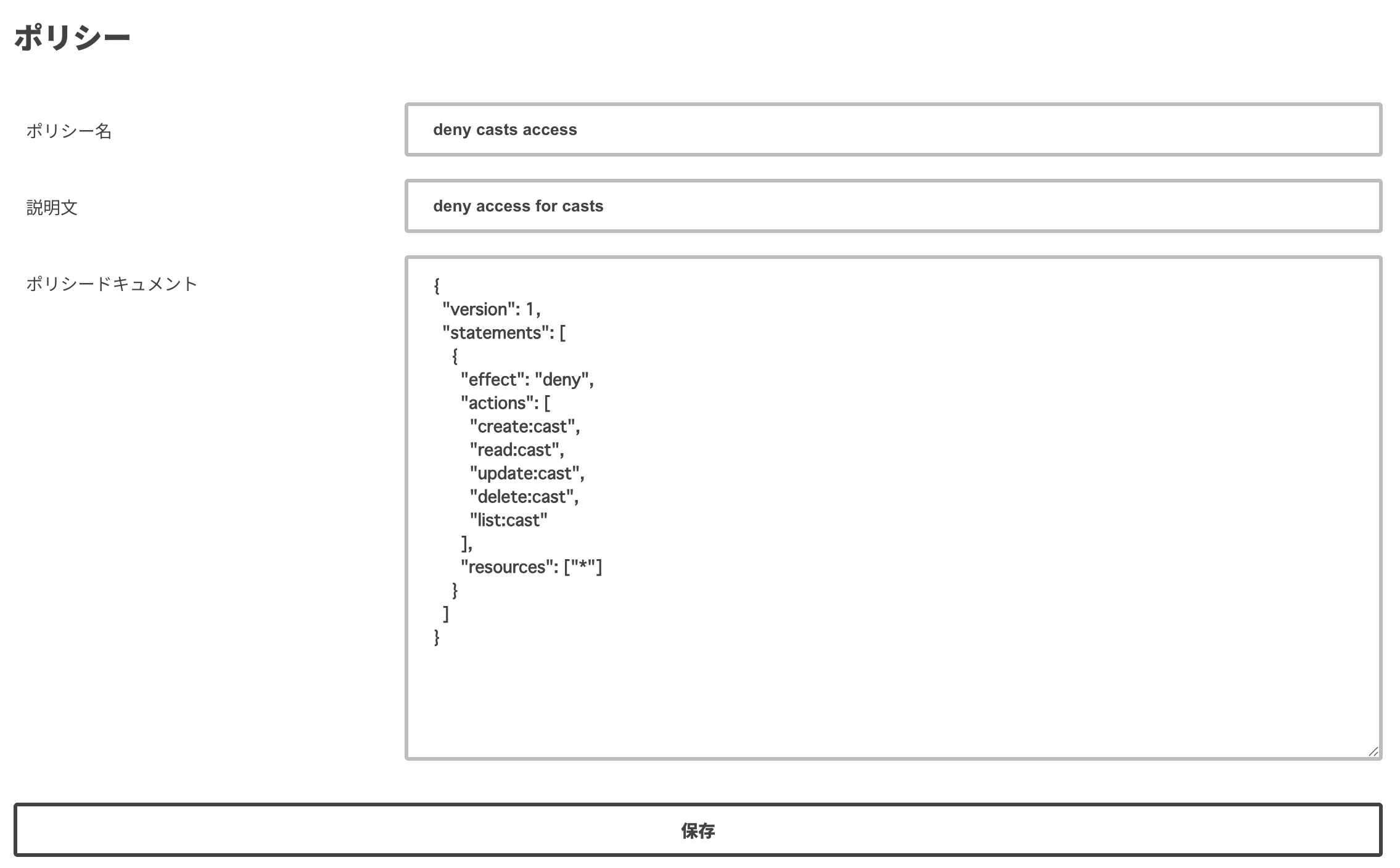
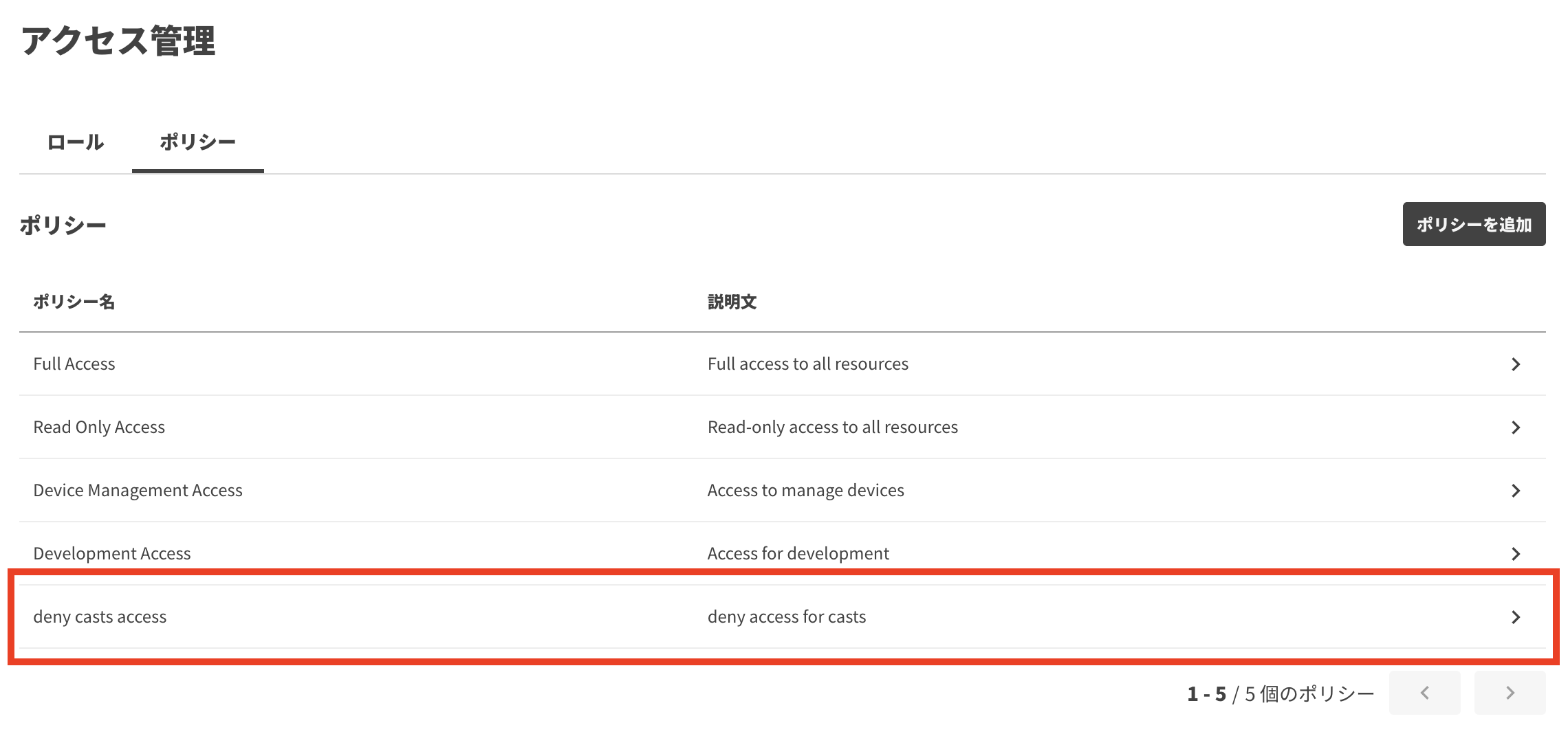
- The new policy appears in the policy list.
Specification
Policy format
Custom policies are written in JSON using the following format:
{
  "version": 1,
  "statements": [
    {
      "effect": "allow" | "deny",
      "actions": ["*" | "specific action", ...],
      "resources": ["*" | "actcast:{resource_type}:{resource_id}", ...]
    },
    ...
  ]
}
version
Specifies the Actcast Policy version. Currently, only 1 is valid.
effect
Set effect to allow or deny. A deny always takes precedence over an allow. Actions not covered by any statement are denied by default.
actions
Specifies the actions to allow or deny. Use * for all actions, or specify an action from the configurable actions and resources list.
resources
Specifies the target resources. Use * for all resources, or specify a resource from the configurable actions and resources list in the format actcast:{resource_type}:{resource_id}.
For resource_id, you can use * or a specific ID. For example, all of the following are valid resources:
*actcast:act:*actcast:act:123
Configurable actions and resources
| Allowed operation | Action | Resource | Notes |
|---|---|---|---|
| Device | |||
| List devices | list:device |
actcast:device:* |
Only this resource is supported. |
| List device tags | list:device_tag |
actcast:device:* |
Only this resource is supported. |
| Register device | create:device |
actcast:device:* |
Only this resource is supported. |
| Take photo | create:device_photo |
actcast:device:{resource_id} |
|
| Execute Custom Command | create:custom_command |
actcast:device:{resource_id} |
|
| Blink device LED | create:blink_led_command |
actcast:device:{resource_id} |
|
| Run firmware update | create:firmware_update_command |
actcast:device:{resource_id} |
|
| Reboot device | create:reboot_command |
actcast:device:{resource_id} |
|
| Shut down device | create:shutdown_command |
actcast:device:{resource_id} |
|
| Run major firmware update | create:major_firmware_update_command |
actcast:device:{resource_id} |
|
| Update device status | create:device_status_command |
actcast:device:{resource_id} |
|
| View device details | read:device |
actcast:device:{resource_id} |
|
| View photos | read:device_photo |
actcast:device:{resource_id} |
|
| Get Custom Command results | read:custom_command |
actcast:device:{resource_id} |
|
| View device logs | read:device_log |
actcast:device:{resource_id} |
|
| View event logs | read:event_log |
actcast:device:{resource_id} |
|
| View Act logs | read:act_log |
actcast:device:{resource_id} |
|
| View Acts on devices | read:device_act |
actcast:device:{resource_id} |
|
| Change device name | update:device_name |
actcast:device:{resource_id} |
|
| Change device hostname | update:device_hostname |
actcast:device:{resource_id} |
|
| Change device Wi-Fi settings | update:device_wifi_setting |
actcast:device:{resource_id} |
|
| Change firmware update prevention setting | update:device_prevent_update_setting |
actcast:device:{resource_id} |
|
| Change firmware configuration | update:device_firmware_config |
actcast:device:{resource_id} |
|
| Change automatic reboot setting | update:device_auto_reboot_setting |
actcast:device:{resource_id} |
|
| Change mDNS setting | update:device_mdns_setting |
actcast:device:{resource_id} |
|
| Change developer mode setting | update:device_dev_mode |
actcast:device:{resource_id} |
|
| Update device tags | update:device_tag |
actcast:device:{resource_id} |
|
| Update Acts on devices | update:device_act |
actcast:device:{resource_id} |
|
| Unregister device | delete:device |
actcast:device:{resource_id} |
|
| Uninstall Acts from devices | delete:device_act |
actcast:device:{resource_id} |
|
| App | |||
| List apps | list:app |
actcast:app:* |
Only this resource is supported. |
| Create app | create:app |
actcast:app:* |
Only this resource is supported. |
| View app details | read:app |
actcast:app:{resource_id} |
|
| Update app | update:app |
actcast:app:{resource_id} |
|
| Delete app | delete:app |
actcast:app:{resource_id} |
|
| Act | |||
| List Acts | list:act |
actcast:act:* |
Only this resource is supported. |
| Create Act | create:act |
actcast:act:* |
Only this resource is supported. |
| View Act details | read:act |
actcast:act:{resource_id} |
|
| Update Act | update:act |
actcast:act:{resource_id} |
|
| Delete Act | delete:act |
actcast:act:{resource_id} |
|
| Cast | |||
| List Casts | list:cast |
actcast:act:{resource_id} |
|
| Create Cast | create:cast |
actcast:act:{resource_id} |
|
| View Cast details | read:cast |
actcast:act:{resource_id} |
|
| Update Cast | update:cast |
actcast:act:{resource_id} |
|
| Delete Cast | delete:cast |
actcast:act:{resource_id} |
|
| SystemCast | |||
| List System Casts | list:system_cast |
actcast:system_cast:* |
Only this resource is supported. |
| Create System Cast | create:system_cast |
actcast:system_cast:* |
Only this resource is supported. |
| View System Cast details | read:system_cast |
actcast:system_cast:{resource_id} |
|
| Update System Cast | update:system_cast |
actcast:system_cast:{resource_id} |
|
| Delete System Cast | delete:system_cast |
actcast:system_cast:{resource_id} |
|
| Group | |||
| View group details | read:group |
actcast:group:{resource_id} |
|
| Update group details | update:group |
actcast:group:{resource_id} |
|
| GroupMember | |||
| List group members | list:group_member |
actcast:group_member:* |
Only this resource is supported. |
| View group member details | read:group_member |
actcast:group_member:{resource_id} |
|
| Media | |||
| List media | list:media |
actcast:media:* |
Only this resource is supported. |
| Create media | create:media |
actcast:media:* |
Only this resource is supported. |
| Delete media | delete:media |
actcast:media:{resource_id} |
|
| ApiToken | |||
| List API Tokens | list:api_token |
actcast:api_token:* |
Only this resource is supported. |
| Create API Token | create:api_token |
actcast:api_token:* |
Only this resource is supported. |
| View API Token details | read:api_token |
actcast:api_token:{resource_id} |
|
| Delete API Token | delete:api_token |
actcast:api_token:{resource_id} |
|
| Edit API Token description | update:api_token |
actcast:api_token:{resource_id} |
Only the token creator can edit it. |
| DeveloperToken | |||
| List Developer Tokens | list:developer_token |
actcast:developer_token:* |
Only this resource is supported. |
| Create Developer Token | create:developer_token |
actcast:developer_token:* |
Only this resource is supported. |
| Delete Developer Token | delete:developer_token |
actcast:developer_token:{resource_id} |
Behavior when there are multiple statements
When a policy contains multiple statements, access is evaluated according to the following rules.
When allow and deny are both present
deny always takes precedence over allow. In the following example, delete:cast is denied for all Cast resources:
{
  "version": 1,
  "statements": [
    { "effect": "allow", "actions": ["*"], "resources": ["*"] },
    { "effect": "deny", "actions": ["delete:cast"], "resources": ["*"] }
  ]
}
When multiple statements contain the same action
If even one statement allows an action, that action is allowed for the resource. In the following example, read:act is allowed for all Act resources:
{
  "version": 1,
  "statements": [
    { "effect": "allow", "actions": ["read:act"], "resources": ["*"] },
    { "effect": "allow", "actions": ["read:act"], "resources": ["actcast:act:123"] }
  ]
}