actfw
This page was machine-translated. The Japanese page is the official version.
Camera-based applications often need to capture images and run classification inference concurrently to achieve high throughput. These applications commonly have three tasks running in parallel:
Capture: capture images from a camera.Predictor: run classification or other processing.Presenter: display results.
Camera capture and Actcast heartbeat reporting are common operations. actfw provides these features as Python libraries.
Libraries
The actfw libraries include:
actfw-core: core functionality shared by Actcast applications.actfw-raspberrypi: functionality useful for Raspberry Pi development.
Install actfw-* packages with pip. The dependencies.json generated by actdk init includes actfw-raspberrypi by default.
Computation model
actfw is an Idein library for describing asynchronous computations. Each task specifies which task to run next, and the data flow is defined with the connect method.
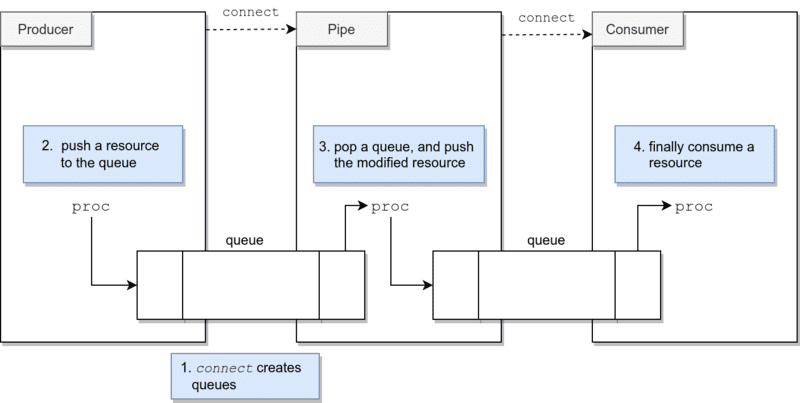
The Application class controls the overall application:
app = actfw_core.Application()
app.run()
Asynchronous tasks fall into three categories:
Producer: continuously creates resources.Pipe: transforms resources and passes them to the next task.Consumer: continuously consumes resources.
For example, an application can capture RGB images, convert them to grayscale, and display them as follows:
import actfw_core
from actfw_core.task import Pipe, Consumer
from actfw_core.system import find_csi_camera_device
from actfw_core.unicam_isp_capture import UnicamIspCapture
import actfw_raspberrypi
from actfw_raspberrypi.vc4 import Display

class Converter(Pipe):
    ...

class Presenter(Consumer):
    ...

app = actfw_core.Application()

# Capture task
capture_size = (CAPTURE_WIDTH, CAPTURE_HEIGHT)
framerate = 30
device = find_csi_camera_device()
cap = UnicamIspCapture(unicam=device, size=capture_size, framerate=framerate)
app.register_task(cap)

# Converter task
conv = Converter()
app.register_task(conv)

# Presentation task
pres = Presenter(settings, camera, cmd)
app.register_task(pres)

# Connect tasks
cap.connect(conv)
conv.connect(pres)

app.run()
This is a simplified version of the grayscale example.
Camera configuration
Raspberry Pi cameras have different interfaces depending on their type.
Official Raspberry Pi Camera Module
Use actfw_core.unicam_isp_capture.UnicamIspCapture for official Raspberry Pi camera modules:
- Pi Camera Module 1
- Pi Camera Module 2
- Pi Camera Module 3 (not supported on ActcastOS 1 or 2)
USB cameras
Use actfw_core.capture.V4LCameraCapture for a generic USB camera.
Implement Take Photo
Camera-based applications are recommended to support the Take Photo command so users can confirm the camera’s position during installation.
Use the CommandServer class to handle the command. CommandServer stores an image and returns it when it receives an image request. Call update_image to update the image that will be returned:
class Presenter(Consumer):
    def __init__(self, ..., cmd):
        self.cmd = cmd

    def proc(self, ...):
        ...
        self.cmd.update_image(rgb_image)
        ...

app = actfw_core.Application()
cmd = actfw_core.CommandServer()
app.register_task(cmd)
pres = Presenter(..., cmd)
app.register_task(pres)
Application health monitoring
The device agent restarts an application that appears unhealthy, for example, if it repeatedly fails to process images. A healthchecker script can check whether the application updates a heartbeat file regularly:
#!/bin/bash
HEARTBEAT_FILE='/root/heartbeat'
[ "$(find "${HEARTBEAT_FILE}" -mmin -1)" == "${HEARTBEAT_FILE}" ]
Update the file timestamp regularly from the application by calling actfw_core.heartbeat().
Display results
Actcast applications often perform sensing without a display, but drawing results can be useful for demos and debugging. The Display object from actfw-raspberrypi can show an RGB image on an HDMI display.
This example displays a 320x240 RGB image scaled to a 640x480 area:
class Presenter(Consumer):
    def __init__(self, camera):
        self.display = Display(camera, (640, 480))

    def proc(self, image):
        self.display.update((0, 0, 640, 480), image.tobytes(), (320, 240), 'rgb')
Implement LocalVideoServer
Implementing LocalVideoServer lets users view a live video stream in a browser on the same network as the device. This is useful when installing a device and checking its operation. See Local Video Server.
Implement custom tasks safely
If the built-in actfw tasks are not sufficient, subclass a Task provided by actfw-core. The implementation must allow the Act to stop promptly. As described in Termination, Actcast sends SIGTERM to stop an Act and sends SIGKILL if it does not stop within the allowed time.
When using actfw, the Application class handles SIGTERM and calls stop on its managed task instances in order.
Subclassing Task or Isolated
Implement the run method. Typically, loop while checking Task.running, which is affected by Task.stop and allows the loop to exit when Application handles SIGTERM.
Avoid blocking for 10 seconds or longer in the loop, for example with time.sleep(10), because the Act may be force-stopped with SIGKILL. For a task that runs once an hour, sleep in short intervals and check whether it is time to run:
class ScheduledTask(Task):
    def run(self):
        while self.running:
            actfw_core.heartbeat()
            # Check whether the scheduled work should run.
            time.sleep(1)
Subclassing Producer, Pipe, or Consumer
These classes provide a default run method that repeatedly calls proc. Implement proc instead, and make sure it does not block for 10 seconds or longer.
If a subclass needs cleanup, implement cleanup (available in actfw-core 2.14.0 and later). It is called at the end of run, even if run raises an exception. Keep cleanup fast; otherwise, the process may be terminated with SIGKILL.
Check termination behavior
Run actdk run -a and press Ctrl-C. An exit code of 0 indicates that the Act stopped normally. An exit code of 137 means it was terminated with SIGKILL; review the implementation until the Act exits with code 0.
An Act that requires SIGKILL to stop can cause the OS to restart when the Act is stopped. This may cause unexpected restarts, for example before a firmware update, and make devices less reliable or troubleshooting more difficult.
If an Act cannot recover by restarting and should remain stopped, see stopact in the App Agent Protocols reference.