Write images
We provide Actcast Writer to burn Actcast Agent image to a micro SD card.
-
Download and install Actcast Writer
-
Connect a micro SD card reader/writer to your PC and insert the micro SD card
A micro SD card must be formatted with
FAT32. Formatting is usually not required for newly purchased micro SD cards of 32GB or less.Please see the following page for formatting instructions.
-
Start Actcast Writer
-
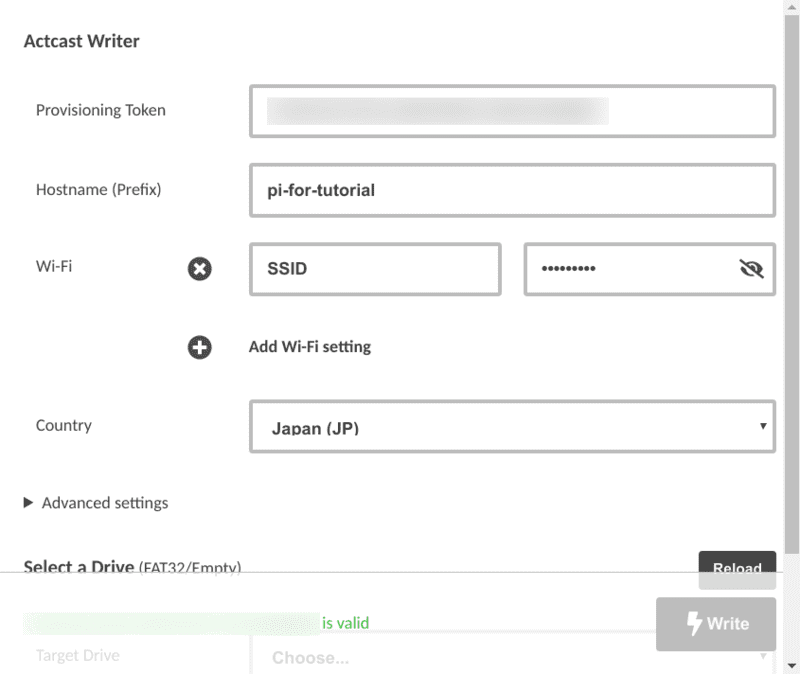
Enter the following information
Provisioning Token- Enter the Provisioning Token issued in Previous Step
Hostname(Prefix)- Enter an arbitrary string to be used as the hostname of the device
- (When using Wi-Fi)
SSID,Password(WPA/PSK)- SSID, password of the Wi-Fi you want to connect to
- Availability of Wi-Fi depends on the device model
- Raspberry Pi 3 Model B and Raspberry Pi Zero W(H), Raspberry Pi Zero 2 W cannot connect to a 5 GHz network point.
Country- Select the country where the device will be installed
The details of each item can be found in config details
-
Select the micro SD card to be written to
-
Click
WritebuttonClick the
Writebutton to burn the Actcast Agent image to the micro SD card.Writing takes about 1 minute (Class10 UHS-1, Read/Write 70MB/s).
Next: Device registration
Previous: Issue Provisioning Token
Last updated on